HTML vs PDF Accessibility: Key Differences & SEO Benefits
Instead of debating over HTML or PDF, it’s more useful to understand what each one is built for. That simple choice can influence how smoothly your content loads, how easily people can read it, and how well it performs in search. A format shapes the entire experience.
In fact, a recent large-scale study of scholarly PDFs published between 2014 and 2023 found that only about 3.2% of documents met all accessibility compliance criteria, highlighting how often PDFs fall short for users relying on assistive tools.
Today’s readers move between devices, screens, and assistive tools, which means your content needs to meet them where they are. This guide looks at HTML and PDF through two practical angles, “accessibility and SEO”, so you can confidently choose the format that works best for your audience and your goals.
What Are HTML and PDF?
HTML and PDF serve different purposes, and understanding the basics makes it easier to choose the right one.
HTML
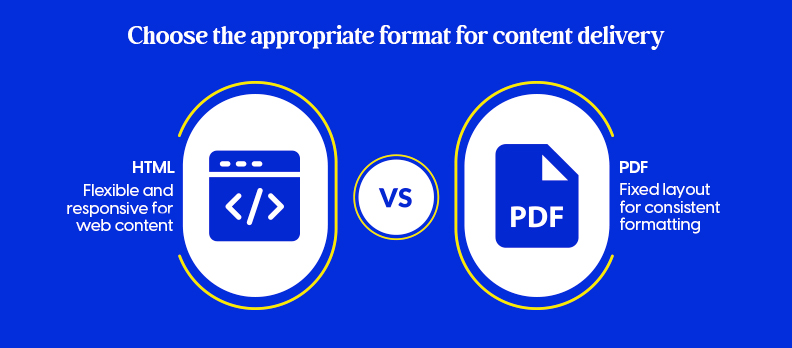
HTML is the format used to build web pages. It adjusts naturally to different screen sizes, supports links and interactive elements, and allows content to be updated at any time.
Because it responds to the device a person is using, HTML is flexible and easy to read on phones, tablets, and desktops.
PDF, on the other hand, keeps everything in a fixed layout. What you design is exactly what the reader sees, no matter where they open it.
This makes PDFs a reliable choice for documents that need consistent formatting, such as reports, forms, or files that people may want to print or download.
HTML vs PDF: Quick Comparison Table
| Feature / Aspect | HTML | |
| What It Is | A flexible web format that adjusts its layout based on the device and screen size. | A document with a fixed design that stays the same no matter where it’s opened. |
| Accessibility Standards | Follows WCAG guidelines for accessible web content. | Built to follow PDF/UA accessibility rules when created correctly. |
| WCAG 2.1 AA Alignment | Can be implemented and maintained consistently across pages. | Possible, but requires manual tagging, remediation, and ongoing checks. |
| Accessibility Features | Uses semantic elements, ARIA roles, keyboard-friendly navigation, and responsive layouts to support accessibility by default. | Can include tags, alt text, reading order, and accessible form fields, but only if added manually. |
| Screen Reader Support | Usually smooth for screen readers because of meaningful HTML structure. | Screen readers work well only if the PDF is properly tagged; untagged PDFs cause major reading issues. |
| Mobile Experience | Converts itself automatically to fit mobile, tablet, and desktop screens. | Not ideal on phones; users often have to zoom, scroll, or use a PDF viewer. |
| Layout & Structure | Can maintain structure but is more adaptable, requiring clean HTML to stay readable. | Keeps the exact design, spacing, and formatting unchanged. |
| Fixing Accessibility Issues | Easier to improve accessibility directly in the code without recreating the file. | Needs specialized software and skills to make changes. |
| Security Features | Security relies on the website’s setup; copying content is often easier. | Offers passwords, encryption, and digital signatures. |
| Skill Requirements | Needs understanding of HTML, CSS, and JS to build accessible, interactive pages. | Requires knowledge of PDF editing tools and accessibility remediation practices. |
| Browser Behavior | Opens directly in every browser with consistent performance. | May open in a viewer or plugin; behavior varies by browser. |
| Offline Access | Needs saving or caching to be available offline. | Perfect for offline use, works once downloaded. |
| Flexibility & Adaptability | Highly adaptable and can respond to user preferences and device settings. | Stays the same everywhere, but doesn’t adjust to different screens. |
| Structural Clarity | Semantic HTML makes the content easier for assistive tools to understand. | Uses internal tags but doesn’t offer actual semantic structure. |
| Language Identification | Uses a simple lang attribute that clearly communicates the language. | Must be manually tagged with a language, and many PDFs skip this. |
| User Engagement | Supports videos, animations, forms, navigation menus, and other interactive elements. | Mostly static; limited interaction beyond basic links or form fields. |
| Search Engine Visibility | Fully searchable and easy to optimize for SEO. | It can appear in search results, but the content inside images or untagged PDFs may not be readable by search engines. |
Accessibility: Key Differences
Understanding how one format fits different users can help make the right choice.
1. Why HTML Is More Accessible
HTML is generally more accessible for people using assistive technologies because its structure is designed for web accessibility by default. Headings, lists, alt text, and landmarks help screen readers understand the content in the right order.
While HTML pages can be written on any screen, mobile phones, tablets, or laptops can be used to read properly without having to work too hard. Another benefit is maintenance; if something needs fixing, edits can be made directly on the page and will allow for the content to be easily shared over time.
2. Accessibility Challenges With PDFs
PDFs can be accessible, but only when they are correctly tagged. Many PDFs online are not tagged at all or are created from scanned documents, which makes them difficult for screen readers to interpret.
Even when a PDF is tagged, the fixed layout can create issues on mobile devices. These users often need to zoom in, move around the page, or scroll awkwardly, which makes readability difficult and may leave people with assistive technology less comfortable.
SEO Benefits: HTML vs PDF
This interaction between format and search engine affects visibility and performance.
1. Why HTML Performs Better in SEO
HTML pages are easier to understand for search engines because they contain a clear structure with headings, links, metadata, and internal navigation. This helps to readability of the content and index it correctly.
HTML also has faster loading times, which can help improve rankings. Finally, updates can be made easily anywhere without replacing any of the page, making it easier to maintain the latest content in order to be accurate for the search engines.
2. SEO Limits of PDFs
PDFs can appear in search results, but they come with several limitations. Many PDFs lack proper tags or structure, which makes it harder for search engines to read the content correctly.
But if a PDF is re-exported and re-uploaded for any type of modification, it is more difficult to keep it updated. They are also larger files, which can affect load speed, another factor that impacts search visibility.
Final Recommendations
For most online content, HTML is the better choice. It offers stronger accessibility, better SEO performance, and a smoother experience across devices. Use it for articles, guides, product pages, and any content that needs to be easy to read, update, and find online.
PDFs are best used for documents that require a fixed layout, such as reports, brochures, forms, or legal documents. If you choose to use PDFs, it will be recommended to secure properly structured and tagged PDFs in order to make them accessible and for search engines to read them.
Take your audience first, and consider the way the audience can find, read, and interact with your content, and what that means when it comes to HTML or PDF.
An accessibility audit will quickly identify any issues and make sure your content is compatible with everyone.
FAQs
Yes. PDFs can be readily accessible by tagging content correctly, adding alt text for images, and logically reading orders. SEO is improved by adding metadata, headings and searchable text. But that shouldn’t necessarily be a performance indicator.
Not always. HTML is better for web content, SEO, and mobile users. PDFs are useful when you need a fixed layout, print-ready format, or downloadable document.
The HTML can be written using any screen size so that it can be read on phones and tablets with ease. PDFs are often zoomed out and scrolling, making it difficult to navigate on smaller screens.
Yes, PDFs can be indexed by search engines if they contain real text and appropriate metadata. But they are harder to optimize and update than HTML pages.
Yes, but HTML needs to be hailed as the SEO strategy. PDFs are available as downloads, but should remain the main accessible version for readers and search engines.