Voice Assistants and Accessibility: Optimizing for Spoken Commands
Voice technology is transforming how people interact with digital devices, from checking the weather to managing smart homes, making life easier for millions.
By 2025, nearly 1 in 5 people worldwide will use voice search (DemandSage). Yet, accessibility gaps like recognition errors and poor design still limit users with speech or language disabilities.
This article explores 7 practical ways to make voice assistants more inclusive, usable, and effective for everyone.
Understanding Accessibility and Voice Interfaces
Accessibility in Digital Design
Being accessible means creating technology that anyone can use, even those who have some kind of disability. It is a concept that changes nothing for users without disabilities but drastically changes for users with visual, motor, hearing, or cognitive challenges.
A standard such as WCAG helps to make digital products more accessible by ensuring that they are perceivable, operable, understandable, and robust.
Voice User Interface (VUIs)
Instead of the usual touch or typing, a VUI enables the interaction of users through speech. Some examples are Alexa, Siri, and Google Assistant.
VUIs utilize the technologies of speech recognition, natural language understanding, and text-to-speech to offer users a non-interactive, conversational, and hands-free way to communicate. Inclusivity and Independence
With the help of voice technology, people can have more freedom and the technology is also more accessible since it allows for the control of the device through the voice without the need for the hands and also provides the feedback in the spoken form.
- Using the voice, people with limited mobility can operate devices.
- The visually challenged can obtain information through the use of sound.
Challenges of Spoken Commands for Accessibility
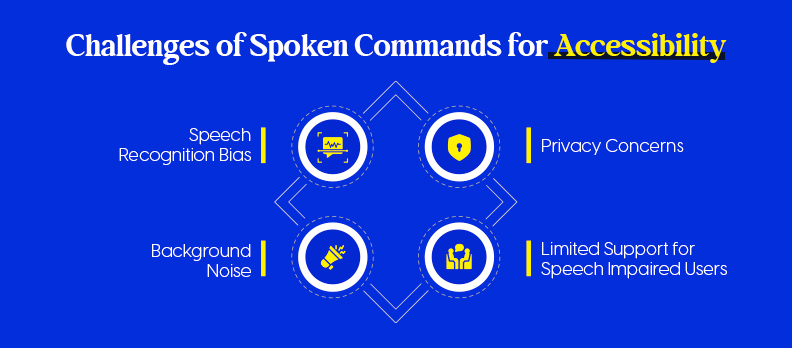
While voice assistants improve digital inclusion, several accessibility barriers remain.
Speech Recognition & Accent Bias
Voice systems often misinterpret non-native accents and dialects. Studies from Stanford’s Fair Speech Project and Georgia Tech (2024) found accuracy gaps of up to 30% for minority English speakers (Stanford Fair Speech ; Georgia Tech News).
Solution: Train AI models with more diverse speech samples.
Background Noise
Noise from homes or public spaces can lower accuracy by up to 40%, depending on environment and mic quality (MDPI Sensors, 2023).
Solution: Use noise-canceling microphones and context-based prompts.
Privacy Concerns
About 72% of users worry voice assistants “always listen,” raising data security fears (Trustable Tech ; ACM Research, 2023).
Solution: Enable on-device processing and transparent privacy settings.
Limited Support for Speech-Impaired Users
Voice systems miss up to 45% of words from users with speech disorders (MDPI Electronics, 2023).
Solution: Develop inclusive datasets and personalized voice training tools like Google’s Project Relate.
Bias, noise, privacy, and inclusivity gaps still hinder voice accessibility. Ethical AI and inclusive design are essential for truly universal voice technology.
Core Principles of Accessible Voice Design
It's not only a point of functionality when you design accessible voice interface; what matters also are clear, comfortable, and inclusive principles that every single user can partake in.
These principles make up the basis of voice experiences which are understandable by all, prompt, and accessible for everybody.
Simplicity and Natural Language Use
- Make your commands brief and unambiguous: Adopt simple, everyday language, which is in user naturally spoken language.
- Don't use technical jargon: Substitute complex terms with their conversational alternatives.
- Let the user know what to say next with the help of the prompt: For example, helps the user know what to do next: "You can say 'Set an alarm' or 'Play music.'"
- Help: The method reduces the user's cognitive load and is very supportive to those who have speech, learning, or memory impairments.
Clear Feedback and Confirmation Tones
- Give a feedback without a delay: An assistant, after receiving an instruction, should confirm a resulting action, either by a short verbal phrase or a sound cue.
- Employ the same pitch or pattern in tones: The auditory elements like brief musical notes or tones confirm that the user's input was taken.
- Error honesty: When a command is not executed, the system should not only courteously tell the reason but also present the alternatives (for instance, "I didn't catch that. Would you like me to repeat the last command?").
- Accessibility impact: Proper and undoubted feedback enables users with sight or cognitive difficulties to be aware of the progress of a task.
Context Awareness and Task Segmentation
- Adjust the system behavior to user intention: By analyzing context, the system can figure out whether the user is asking a follow-up question or initiating a new task.
- Separate complex ideas into simple ones: Any long or complicated dialogue should be broken down into simple, sequential questions.
- Help: Keeps the user from being puzzled, especially those with memory or processing problems.
Alternative Navigation Methods (Visual/Haptic Support)
- Allow the users to be informed through different channels: Along with voice, you can also provide visual (text on the screen) or haptic (vibration) information.
- Those who have hearing disabilities: Text messages confirming the command or visually highlighting the area of the screen can be the replacements of a verbal message.
- Blind users: Tactile signs, e.g., light vibrations, can give the users the feeling that the device has accepted their input.
7 Ways to Optimize for Spoken Commands
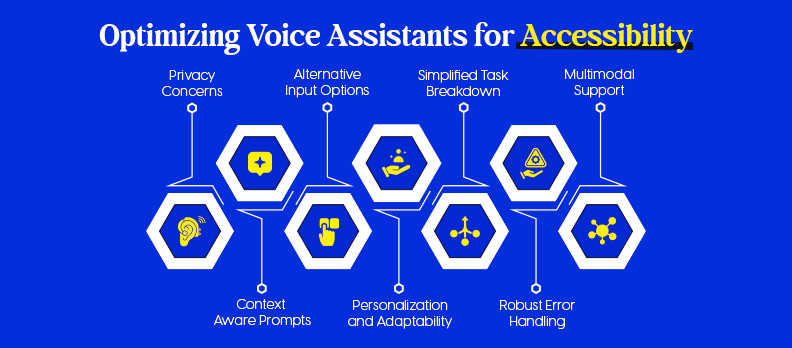
As voice assistants become everyday companions, optimizing them for accessibility ensures that everyone, regardless of ability, accent, or environment, can interact with technology easily and confidently.
Below are seven practical, design-focused ways (with small code examples) to make spoken command systems more inclusive, natural, and reliable.
1) Use Context-Aware Prompts and Responses
- Keep state: Remember prior intents, slots, and user goals so follow-ups feel natural.
- Confirm context: “Do you mean the kitchen lights or living room lights?”
- Avoid dead ends: Offer next best actions after each reply.
Mini-pattern (JS, pseudo-state):
// Keep conversational context

const ctx = { lastIntent: null, slots: {} };

function handle(intent, slots) {

 if (ctx.lastIntent === 'SetTimer' && intent === 'Pause') return pauseTimer();

 ctx.lastIntent = intent;

 Object.assign(ctx.slots, slots);

}
2) Design for Personalization and Adaptability
- Remember preferences: speech rate, verbosity, confirmations on/off, preferred names.
- Adapt phrasing: Mirror the user’s vocabulary (“lights” vs “lamps”).
- Accessibility toggles: quick commands to slow speech or add detail.
Mini-pattern (Web Speech API, TTS speed/verbosity):
const u = new SpeechSynthesisUtterance(text);

u.rate = user.pref.rate || 0.9;       // slower for clarity

u.volume = user.pref.volume || 1.0;

speechSynthesis.speak(u);
3) Implement Robust Error Handling and Recovery
- Graceful retries: Rephrase + offer choices after 1–2 misses.
- Confidence-based behavior: Only act when ASR confidence is high; otherwise confirm.
- Short, specific reprompts: “Did you say set a 10-minute timer?”
Mini-pattern (confidence + fallbacks):
function onASR(result) {

 if (result.confidence < 0.6) return speak("I’m not sure. Did you mean timer or alarm?");

 // proceed

}
4) Enable Multimodal Support (Voice + Visual)
- Show what was heard: on-screen transcript/captions.
- Mirror actions visually: cards, progress bars, toggles.
- Haptics: brief vibration on success/error (mobile).
Mini-pattern (visual transcript + ARIA live):
<div id="heard" aria-live="polite"></div>

<script>

heard.textContent = `"${asrText}"`;

</script>
5) Break Down Complex Tasks into Simple Commands
- Progressive disclosure: one question at a time, confirm before committing.
- Chunk inputs: date: time: recurrence; address: item: quantity.
- Offer defaults: “I can book for 7 pm; want to change it?”
Mini-pattern (slot-by-slot):
const flow = ["date","time","partySize"];

function nextMissing(slots){ return flow.find(s=>!slots[s]); }
6) Provide Alternative Input Options
- Always offer a fallback: touch, text, keyboard shortcuts.
- Caption everything: show command options on screen.
- Timeout path: if mic is noisy, suggest tap or type.
Mini-pattern (simple fallback UI):
<button aria-label="Turn on kitchen lights" onclick="turnOn('kitchen')">Kitchen On</button>

<input aria-label="Type a command" onkeydown="if(event.key==='Enter') handleText(this.value)">
7) Test with Diverse Users, Especially Those with Disabilities
- Recruit widely: accents, speech rates, impediments, assistive tech users.
- Measure what matters: task success, error recovery time, perceived effort.
- Iterate fast: log misrecognitions; add synonyms/utterances where users fail.
Mini-checklist (quick ops):
- Include ≥5 accents and at least one speech-impaired participant per round.
- Track ASR confidence, NLU fallback rate, and 2-turn recovery rate.
- Validate with screen readers (VoiceOver/TalkBack) and captions on.
Case Studies and Real-World Examples
Google Assistant stands out as a leader in inclusive voice technology, emphasizing independence, adaptability, and personalized accessibility.
Voice Access: Hands-Free Control for All
At the heart of Google’s accessibility ecosystem is Voice Access, an Android feature enabling users to navigate and control their devices entirely through voice commands.
A 2024 Google Research study found that Voice Access improved task completion rates by 65% for users with motor impairments compared to traditional touch input.
This hands-free approach empowers users to perform daily actions like texting, browsing, or controlling apps, without relying on fine motor movements.
Project Relate: Understanding Atypical Speech
Google’s Project Relate is designed for individuals with speech impairments. The app uses machine learning to train Google Assistant to understand each user’s unique voice patterns.
In early trials, Project Relate achieved a 37% improvement in speech recognition accuracy, helping users with conditions like cerebral palsy or dysarthria communicate more naturally and effectively.
Learn more on the official Google Accessibility page.
Inclusive Design in Practice
Google’s design philosophy emphasizes real-world testing with diverse users and multimodal interaction—combining voice, touch, and visual cues for clarity.
This iterative, human-centered approach ensures that accessibility isn’t an afterthought but a core part of the experience.
Key Takeaway
By prioritizing adaptive learning and personalized interaction, Google Assistant demonstrates how voice technology can bridge communication gaps, empowering users with disabilities to navigate the digital world more freely and independently.
Measuring Accessibility and Optimization Success
Building and maintaining accessible voice experiences means measuring real impact, not just deploying features. Regular audits, user testing, and performance tracking help ensure your voice assistant remains inclusive, accurate, and reliable for everyone.
Key Metrics for Accessibility Optimization
To assess accessibility performance effectively, track both technical accuracy and user satisfaction metrics:
- Recognition Accuracy:
Measures how correctly the system interprets spoken input. Aim for 90%+ accuracy in ideal settings and 80%+ in real-world use. According to Stanford HAI (2023), current voice assistants show up to a 30% drop in accuracy for diverse accents, a reminder that inclusivity starts with robust training data. - Task Completion Rate (TCR):
Shows how often users can finish tasks via voice without switching to touch or typing. A TCR above 85% signals strong usability. Google’s Voice Access improved task success by 65% for users with motor impairments. - Error Recovery Rate:
Indicates how easily users can recover after misinterpretations. High recovery (≥70%) means the system handles misunderstandings gracefully. - User Satisfaction:
Collect qualitative feedback through in-app surveys or verbal prompts. Pair this with behavioral data to measure emotional engagement and trust over time.
Accessibility Audits and Testing Tools
Ongoing audits help uncover usability barriers early and ensure compliance with accessibility standards.
- Automated Audits:
Tools like the Access Audit provide AI-driven accessibility scanning to identify technical gaps and suggest improvements for voice-enabled systems. - Monitoring Performance:
The Access Monitor continuously tracks performance, accessibility scores, and compliance trends, making it easier to maintain long-term inclusivity. - Widget Integration:
Using an accessibility overlay such as the Access Widget can enhance usability by allowing users to personalize their interaction settings, like text size, contrast, or reading preferences, across web and app interfaces. - Comprehensive Services:
For deeper analysis, the Access Services suite offers audits, consulting, and training to ensure ongoing accessibility compliance across digital touchpoints. - Reference & Help:
The Compliance Hub centralizes accessibility standards and WCAG updates, while the Help Center supports developers and organizations during implementation.
User Feedback and Continuous Improvement
Accessibility isn’t a one-time milestone, it’s a cycle of learning, testing, and refining.
- Collect Real Feedback:
Use in-app prompts like, “Was that helpful?” or “Did I understand you correctly?” to gather user insights after each interaction. - Co-Design with Diverse Users:
Include people with disabilities, different accents, and varied speech patterns in every testing phase. A Google Accessibility (2024) study found that co-designing with users with disabilities reduced post-launch issues by 40% (Google Accessibility Blog). - Iterate Regularly:
Update voice models with real-world feedback. Incorporate diverse speech data, environmental noise samples, and behavioral insights from monitoring tools to make systems more inclusive over time.
Conclusion: Building an Inclusive Voice-First Future
Accessibility isn’t optional, it’s essential to creating voice technology that truly serves everyone. By designing context-aware, multimodal, and user-tested experiences, you make your assistant more intuitive, empathetic, and inclusive.
Start improving your platform’s accessibility today with a Free Accessibility Audit, a quick, AI-powered scan that helps you identify issues and enhance usability for all users.
FAQs
An accessible voice assistant supports users of all abilities by providing clear speech recognition, visual or haptic feedback, and simple, natural language interactions.
Developers should conduct usability testing with diverse users, including those with disabilities, and use automated accessibility audits to identify and fix barriers.
Most systems are trained on limited datasets, so they may not recognize regional accents or non-native speech patterns accurately. Broader training data helps solve this issue.
Yes. Personalized speech recognition and adaptive tools now allow users with speech impairments to train assistants to better understand their voice patterns.
Accessibility improves usability for everyone - making voice assistants more intuitive, responsive, and user-friendly, regardless of ability.
It should be reviewed continuously, with periodic audits and user feedback sessions to ensure ongoing improvement and compliance with accessibility standards.